Project
Service Operations Map
A touchscreen map for a septic-services business that geocoded customer addresses to show pricing zones, service-due heatmaps, and upsell flags. The shop adopted it in place of its sticker wall map.
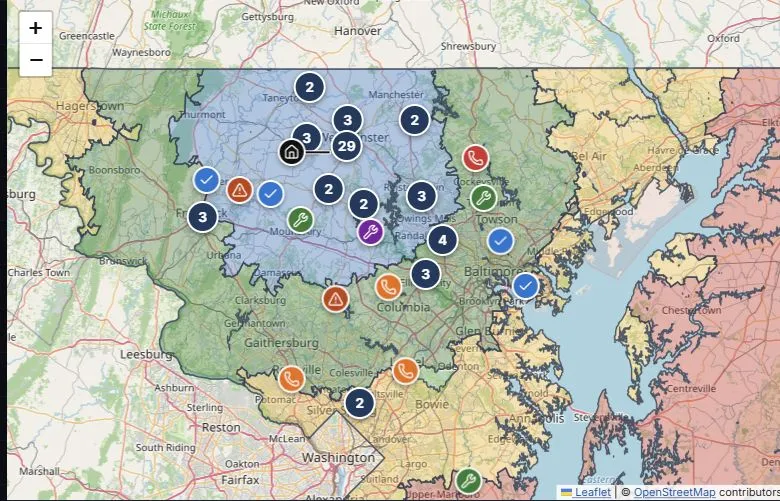
Use arrow keys to pan and + or − to zoom when the map is focused, or choose a site from the list.
This demo is generalized from the real service-business application described below. The company, headquarters, customers, and pricing assignments are fictional; no client records are shown.
The screenshot shows the same demo data as the interactive map. Bold borders mark pricing tiers; faint lines mark ZIP areas.
View full-size screenshot. Map data: © OpenStreetMap contributors. Boundaries: 2010 Census ZCTAs via Maryland iMap; counties via Maryland iMap / U.S. Census / Maryland SHA.
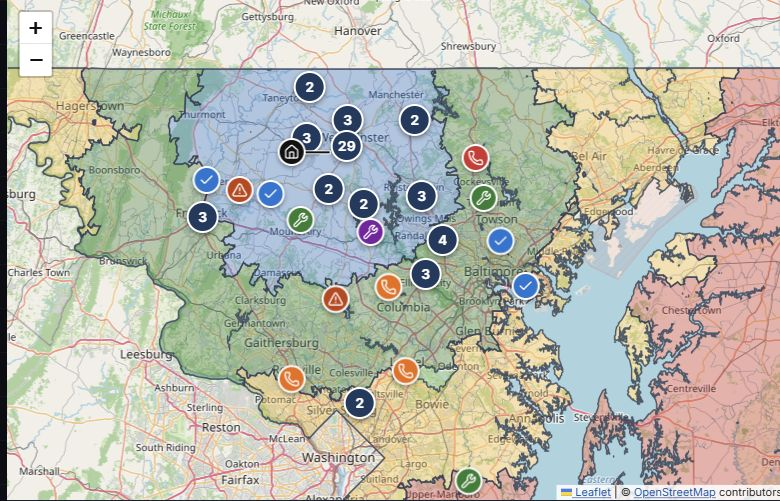
Text description of the Service Operations Map
A demo headquarters and 72 service sites appear in central Maryland. Demo customer locations favor populated areas near headquarters, with fewer sites in higher-priced zones. Blue, green, yellow, and red pricing areas follow real ZIP-based boundaries, with demo pricing assignments. Wrench, phone, check, and warning symbols distinguish due service, recent service, contract status, special service, and missing information. Nearby sites appear in numbered groups, which can be turned off in the map settings. Zoom in or use the site selector to inspect a location; use the status filters to narrow the map.
A septic-services business runs on two questions: where are my customers, and who’s due? Both answers sat in a spreadsheet no one could actually see. I turned it into a map you could walk up to and touch.
The problem
The customer list had everything and showed nothing. Routing ran on memory, reminders were ad hoc, and the upsell opportunities in the data — a cluster overdue on one road, customers in a pricing zone — were invisible because the data had no spatial form.
Constraints
- Effectively no budget — free libraries, hardware on hand.
- Usable by non-technical staff — no query language, no training. Walk up and touch.
- The display was a repurposed big-screen TV.
Approach
I geocoded the spreadsheet addresses with geopy and built an interactive
Folium map, pandas handling the data. On top I layered what the business
cared about: pricing zones drawn as regions, service-due heatmaps that make
overdue clusters jump out, and upsell flags.
Then I made it physical: the map ran full-screen on a big-screen TV fitted with an infrared touch overlay — a wall-sized tablet you explored by pinching to zoom and dragging to pan, with a mouse as fallback.
Keeping it current was automatic. The customer list lived as an Excel file on a shared drive the office already maintained; a scheduled task ran after close each day — reading the file, cleaning new entries, geocoding new addresses, and rebuilding the map — so every morning reflected the prior day with no manual step.
Outcome
It replaced a physical wall map the owner and secretary updated by moving stickers — only ever as current as the last time someone re-stuck it.
The shop adopted the digital version and ran on it. I don’t have hard numbers — small family business, not an instrumented product — but it did what the sticker map couldn’t: overdue clusters surfaced for tighter routing, upsell-fit customers got flagged, and service-due accounts got caught before they slipped. The map became where people looked to decide where the trucks went.